Thanks for the answer!

Atleast there is some activity waiting for a solution XD.

I supose that i will try the tuesday to delete Cutenews and reinstall , maybe an older version ?

Btw how do i uninstall cutenews ? Or just deleting the folders from the host is ok ?

Thanks again.

Hi
It is a shame that there are troubles with the new version of Cutenews.  I tried to update to v2.0.2 from 1.4.6 and couldn't do it. I gave up.

Version 1.4.6 works fine except that I have run out of memory and cannot get it increased - well I haven't asked my host yet. Unable to alter the memory quota myself as the host doesn't allow it.

I suppose that if there is little worth saving just delete all the cutenews files (backup first just in case).

How can i add sub categories in php ?

Hi thesiddharth  You just select to add a category as the parent to the category that you want to make a sub-category.  The default setting for a new category is "None".

I'd be very wary about adding sub-categories as doing so lead to trouble on my website. I had a category "Home page" and added three new categories: Home page left, Homepage middle, and Home page right.

I thought that I could then post to any one of the child categories or the Home category. It didn't work like that refer to the Support reply above. I had $Number set to 1 for the middle category and there were two posts in that category. that gives rise to a <<previous . . . next>> pagination.

If the visitor to the website clicks on the pagination. The middle post is duplicated "over" the other posts on the page!

In which template do you apply this structure?

That line of code is part of the default template.

Add News / Edit news: Ckeditor

Click on Image Symbol -> Browse Server -> Media Manger opens -> choice your Photo, click on it -> save your news.


No Perry that doesn't work. I have replied after you having missed your reply. Sorry about that I still cannot get email updates from the forum.

If I do as you suggest the image when clicked opens a new window with the image set against a black background. Nothing else, just a screen. This was using Firefox 36.0.4 running under XP Pro. Firefox has just updated itself to 37.0.1 but it produces the same result.

Style your page with CSS: http://htmldog.com/guides/css/beginner/applyingcss/

Inline in your template or external with an separate css file.

This is the button to insert images:

That button doe NOT insert images. And besides, there is no reason as you suggest to alter any template just to centre an image in just one post.

CKEditor: the option to centre a post should be within CKEditor and it is not. CKEditor is rubbish compared to the wsiwyg editor in version 1.4.6.

Most of my web pages have several Cutenews includes inserting news in up to three columns. My websites worked under 1.4.6.  Three weeks after installing v2.0.2 I am still awaiting resolution of basic issues:

Why doesn't Search work?

Why does CKEditor insert unwanted blank lines inserting news from Microsoft Word files? I just copied and pasted using 1.4.6

And why cannot an image be inserted easily. Like using this forum!!! I had no issues under 1.4.6

It would really help if the owners of CuteNews were prepared to write an updated guide to using CuteNews, instead of relying on a few Support staff and forum users to explain how Cutenews can be and must be used. 


Hi

I am trying to insert an image into a post. I have found that it seems that one must use Media Manager to upload the image. The image is there but there is no option to INSERT it. I have tried dragging it, that doesn't work.

Does anyone know how to do this?  Stuck  https://cutephp.com/forum/style_emoticons/default/sad.gif

This maybe completely irrelevant I am using IE 8 under XP Pro.

No it is not irrelevant! I used Firefox instead and could drag and paste the image to my news article. But there was no button or option labelled INSERT.

PS. I couldn't centre the image in CKEditor. Right clicking opens a Properties box but there is only Align left, right, or not set.  I suppose that is because center has been deprecated. I had to use

style=" display: block; margin: 0 auto;"

Hi

I am trying to insert an image into a post. I have found that it seems that one must use Media Manager to upload the image. The image is there but there is no option to INSERT it. I have tried dragging it, that doesn't work.

Doers anyone know how to do this?  Stuck  https://cutephp.com/forum/style_emoticons/default/sad.gif

This maybe completely irrelevant I am using IE 8 under XP Pro.

We are aware of this problem and in the next release it will be fixed. You need to wait for the update.

Thank you  https://cutephp.com/forum/style_emoticons/default/smile.gif

If you output data from the main category, the filter will include all sub-categories as well. This is a normal behavior of CuteNews. If you want only the data of subcategories to be shown, do not assign a parent to it.

Thank you.  The way I use CuteNews requires often over 50 categories. I thought in the absence of user documentation on this new feature that the idea was to enable the user to organise their categories more easily.

The question is since I do not want to publish news articles from both the parent and sub-categories whether I can just leave the parent categories in place and not use them?

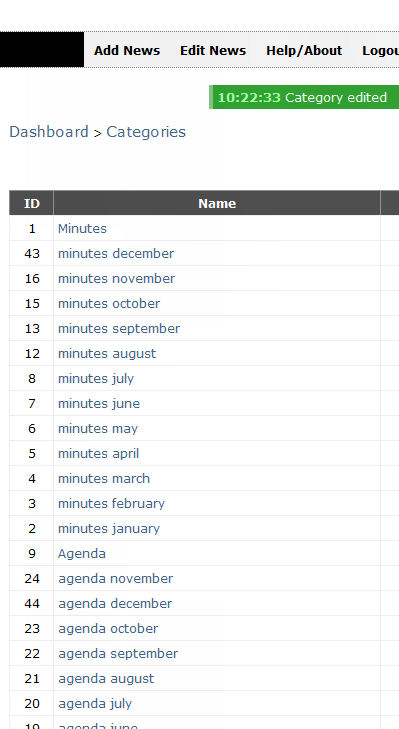
Support has been unable to answer my query at present.  I would just like to mention that unless any category is ascribed a parent it cannot be described as a sub-category or am I missing something? I have edited all categories on my website that had parent settings. This is the result:

http://southwickwilts.co.uk/images/parent%20category%20issue.jpg

The order of the categories have been spoilt. Both the Minutes and Agenda categories were set as parents to the monthly minutes and agendas they are now in reverse order. There was one slight abnormal setting on my part as I had to add August after I had completed the other months. The reason being that some parish councils do not have meetings in August. Fortunately each category still has its assigned number.

Hi

I have many includes with different categories. If there is no news for any particular category then pagination appears. Previous Next appears and takes up most of the width of the "box" for that category.

The only way I can get rid of it is to post a news article. I do this by just adding three full stops thus ... This is virtually an empty news item.

How do I stop the unwarranted pagination from happening with empty categories? This error does not happen with v1.4.6

Hi  This is a rewritten account of the problem of getting Cutenews Search working Cutenews version 2.0.2  I have made copies of my index page as the site is live and I didn't want to update it till I have Search working. I have followed support's suggestion of studying the pinned article about getting Search installed. In addition I have added some code from another user "whis" who had had trouble installing Search.

I still have not resolved the problem.  It should be easy. I have added some echo statements to the page where the search results should be displayed. Please refer to the code box at the end of the post.

First using whis's suggestion to put the following code before HTML etc. on the page where the form is:

<?php

require_once("cutenews/core/init.php");

// Play with settings --------------------------------------------------
$pw = REQ('pw');

if ($pw['PHP_SELF']) $PHP_SELF = $pw['PHP_SELF'];

?>


Next the Form code, slightly modified to locate nicely on my website:

                <div id="sitesearch">
                    <!-- SECTION: SEARCH -->
                  <form action="sitesearch.php" method="GET">
                    <input type="hidden" name="dosearch" value="Y" >
                    <div>
                        <input style="width: 180px; padding: 4px;" class="text" type="text" name="search" value="<?php echo cn_htmlspecialchars(REQ('search')); ?>" >
                        <input style="width: 75px; padding: 4px;"  class="submit" type="submit" value="search" >
                    </div>
                </form>
                 </div> <!-- site search -->

Finally the code on the page where I want to display the search results:

                        <td class="centralbox">
            <?php
                if (isset($_GET['search']) &&$_GET['search'])
                {
                    include ("search.php");
                }
                else
                {
                    include ("show_news.php");
                }
            ?>
                     </td>

The Search box displays ok and the page URL on which the search results should be displayed is displayed in the browser window. But no results displayed.

I had to remove Support's code line:

     <form action="<?php echo PHP_SELF; ?>" method="GET">

    as the page just hung.

The site's on a Linux server. CuteNews 2.0.2 Build ID-202.

<?php
                if (isset($_GET['search']) &&$_GET['search'])
                {
                    include ("search.php");
                    echo "test before else statement,  ";
                }
                else
                {
                echo "test after else";
                    include ("show_news.php");
                            echo "test after show news include";
                }
            ?>

The flow of control through the code doesn't get past the ELSE condition. But it does process the search include, doesn't it?

This is the current situation: Visit My Website

Hi

I have found that if I post to a category that is a child to a parent the post overwrites the parent.

Correction: On checking I have a category "newsletters" I added a new category "newsletter LHS" with "newletters" as parent.
I posted to the child category - the subcategory "newsletter LHS".  Result the news item was posted to both the parent and the subcategory.  I had to edit the subcategory and remove its Parent setting to "none".

Cutenews seemed to be behaving as if I had chosen to post the news in more than one category. I checked this, just in case, but can confirm that I was only posting to the subcategory.


38

(1 replies, posted in Problem Solving / Help & Support)

Everything is working but i am not able send Query of IMG name to the database and also couldn't save image to a folder. please help me

I am newbie to php so please dont mind.


                <?php

                require('login/connect.php');
                ini_set("display_errors", "1");
                  error_reporting(E_ALL ^ E_DEPRECATED);


                        $p_name = $_POST['p_name'];
                        $p_desc = $_POST['p_desc'];
                        $p_man = $_POST['p_man'];
                           $p_brand = $_POST['p_brand'];
                        $p_model = $_POST['p_model'];
                        $p_sku = $_POST['p_sku'];
                        $p_price = $_POST['p_price'];
                        $p_sprice = $_POST['p_sprice'];
                        $p_qun = $_POST['p_qun'];
                        $p_weight = $_POST['p_weight'];
                        $p_color = $_POST['p_color'];
                        $p_size = $_POST['p_size'];
                        $p_img = $_FILES['p_img'];
                        
                        if (($p_img["type"] == "image/jpeg") || ($p_img["type"] == "image/jpg") || ($p_img["type"] == "image/png") || ($p_img["type"] == "image/PNG") || ($p_img["type"] == "image/JPG")) {
                            echo $path = '../uploads/'.$FILES["p_img"]["p_img"];
                            if (move_uploaded_file($p_img['tmp_name'],$path )){
                                $sql= "INSERT INTO `upload`(`p_name`, `p_desc`, `p_man`, `p_brand`, `p_model`, `p_sku`, `p_price`, `p_sprice`, `p_qun`, `p_weight`, `p_color`, `p_size`, `p_img`) VALUES ('$p_name','$p_desc','$p_man','$p_brand','$p_model','$p_sku','$p_price','$p_sprice','$p_qun','$p_weight','$p_color','$p_size','$p_img')";

                                $result = mysql_query($sql);
                                if($result){
                                    header("location:login/thankyou.php");
                                }else{
                                    echo '<script type="text/javascript">';
                                    echo 'alert("mysql_error()")';
                                    echo   '</script>';
                                }
                            }else{
                                echo "Please Try Again";
                            }
                        }else{
                            echo "Invalid image";
                        }

                   
                ?>

Cutenews doesn't have a database

You incorrectly named the search field. It should have name="search" while now it has name="story". Please study closely the source code in the following topic https://cutephp.com/forum/index.php?showtopic=44564

Thank you I have done so. Referring to that post. the first code block : "You can look up a way to show the search box in example.php"

I do not need that advice as I have a search box located in the banner of my Home page that is nicely positioned. But there might be code in that example that should be incorporated in what I have already, as what I have is different:

                <div id="sitesearch"> <!-- this the location of the search box it is on the Index page -->
                 <form action="sitesearch.php" method="get">
        <input type="text" name="search" size="28"> <!-- replaced name="story" as advised to name="search" -->
        <input type="hidden" name="dosearch" value="yes">
        <input type="submit" value="Search" style="height: 26px"> 
      </form> 
                 </div> <!-- site search -->
                 
                  <!--webbot bot="HTMLMarkup" startspan --><?php 
      if((isset($_POST['do']) && $_POST['do'] == 'search') 
      or (isset($_GET['dosearch']) && $_GET['dosearch'] == 'yes')){  
      $subaction = 'search';  
      $dosearch = 'yes';  
            } ?><!--webbot bot="HTMLMarkup" endspan -->

Referring to the 2nd code block: "Then you will need to make the following changes on the news displaying page  . ."

I added that code to my sitesearch.php page. Nothing is displayed. The relevant php code is below:

<?php
                if (isset($_GET['search'])&&$_GET['search'])
                {
                    include ("search.php");
                }
                else
                {
                    include ("show_news.php");
                }
?>

I am puzzled by the paths to both search.php and show_news.php as they do not include the parent directory "cutenews". But if I alter them to include the parent directory a warning message is displayed as mentioned in the OP.

I did alter "story" to "search" with no effect.

My use of PHP and understanding of PHP is very limited and like other would be users of Cutenews I expect to just copy and past code that just works. Surely this is possible?

I would like examples that are simple and easy to understand. The Example file that is included with 2.0.2 is very impressive but is of little use to someone learning to use the newest version of CuteNews.

Please note I am using v2.0.2 Build ID 202 NOT 2.0.1 - I can't edit the title of this post. Perhaps a moderator can.

Hi

I have been trying to get site search working on my website. The message I am getting: "Cutenews has detected that you are using show_news.php using the URL to this file . . .".

But I am NOT including show_news.php I am including search.php.  https://cutephp.com/forum/style_emoticons/default/mad.gif


<div id="sitesearch">
         <form action= "sitesearch.php" method="get"> <!-- sitesearch.php is my news search results page -->
        <input type="text" name="story" size="28">
        <input type="hidden" name="dosearch" value="yes">
        <input type="submit" value="Search" style="height: 26px"> 
      </form> 
                 </div> <!-- site search -->
                         <!--webbot bot="HTMLMarkup" startspan --><?php 
      if((isset($_POST['do']) && $_POST['do'] == 'search') 
      or (isset($_GET['dosearch']) && $_GET['dosearch'] == 'yes')){  
      $subaction = 'search';  
      $dosearch = 'yes';  
            } ?><!--webbot bot="HTMLMarkup" endspan -->

The relevant section of sitesearch.php is included below

<?php
include('cutenews/search.php');
?>

The message I am getting is:"Cutenews has detected that you are using show_news.php using the URL to this file". But I am NOT including show_news.php I am including search.php.

My client is disturbed that the Search button is not working yet.  Is Support on holiday? https://cutephp.com/forum/style_emoticons/default/mad.gif

#Clean the text

CKeditor -> SourceCode Button: delete all styling <Tags> in the raw text ?

Thanks Perry

It didn't occur to me to edit the source. With Cutenews's 1.4.6 editor when something is aligned and the option deselected more code is added to the news. overruling the previous setting If the programmers of CKeditor intended that a given passage of text cannot have its align setting altered it should be published in a warning note.

I found that justify is set in the cutenews template. Its a default setting. I don't know why its included in a template. Justified text may look neat to some people but that is about the only thing that can said for it.  Justified text is harder to read, especially for anyone that has a disability. Anyway, CKEditor has options for aligning text including Justify so why set it in a template.

What part of the site would you like to style?

Well the issue is that CKeditor does not unjustify text. Left, centre and right align work but text that is accidentally justified is stuck on that setting. I have checked this and can confim that there is a bug.

Is your website online?
if not please make an example on codepen.io like this: http://codepen.io/anon/pen/jEQzgG

greetings

Hi Perry. Thanks for the link to codepen.io It will take a while to get to use it. My website is online:  Visit My Website

[quote name='Perry' date='Mar 16 2015, 10:20 PM' post='160662']
Please post your template code.

Hi Perry

<div style="width: 100%; margin-bottom: 10px">
<div>

<div style="text-align: justify; padding-bottom: 3px; margin-top: 20px; padding-left: 3px; padding-right: 3px; margin-bottom: 5px; border-top: #d3d3d3 1px solid; padding-top: 3px">{short-story}
<div style="margin-top: 10px">[full-link target=_blank]Read more... [/full-link]</div>
</div>