
Please, describe what kind of errors has shown and the process of upgrading.
176 2015-04-22 12:58:14
Re: How to migrate 2.0.2 to 2.0.3 ? (29 replies, posted in Problem Solving / Help & Support)
177 2015-04-22 12:04:22
Re: Mod Rewrite Engine (8 replies, posted in Problem Solving / Help & Support)
Layout file is the file where show_news.php is located.
Rewrite Engine works the following way:
1. A .htaccess file is created in the root, where the rewrite rules are written only for CuteNews, not for users.
2. A link in the form of /myarticle.html is generated.
3. Now (and that is important) all articles in the form of /myarticle.html will be displayed the same way as if example.php? Page_alias = myarticle was requested.
This is the logic of Cutenews Rewrite functioning.
So the layout file is that very file is in the mechanism of Cutenews Rewrite Engine, which makes all queries go exactly there. Any queries that are built correctly.
As to the layout that does not work, when Rewrite is enabled, paths to News get wrong all the time and at the same time there should not be used any relative links like href = "css.css", but only precise links to the website in the form of "/css/css.css".
178 2015-04-22 11:26:37
Re: Rewrite Issue (1 replies, posted in Problem Solving / Help & Support)
CuteNews doesn't provide such a possibility of changing link types, which is done primarily for ease of use, since CuteNews works with a strictly defined set of input data and output depends on them.
179 2015-04-22 09:49:10
Re: Related news (3 replies, posted in Problem Solving / Help & Support)
Cutenews doesn't provide an opportunity to do Related Posts, but the following code might be helpful.
Based of this code, $ number of news will shown, but an important point is that the basis of the filter is tags. It means that posts will be shown only in accordance with the tags present in the post which is opened as Full News and with the tags present in active news. Each time a random tag will be chosen from the main news and searched.
Here's the code:
// Your code there
include("show_news.php");


// Related Posts by tags
$GET = $_GET;

// Extended code for related posts
if (isset($_GET['id']) && $_GET['id']) {

    // Include required LIB!
    require_once 'cn_api.php';

    // Get current entry
    $info = cn_api_get_entry($_GET['id']);

    // Number of related posts
    $number = 5;

    // Show if TAG is presents
    if ($info['tg']) {

        $_tags = explode(',', $info['tg']);

        // Get RANDOM tag for search
        $_GET['tag'] = $_tags[mt_rand(0, count($_tags)-1)];

        unset($_GET['id']);

        // List post
        include("show_news.php");
    }
}

$_GET = $GET;180 2015-04-22 09:22:54
Re: Highlight search results (2 replies, posted in Problem Solving / Help & Support)
To activate the highlight of the results, it is necessary to enable the Highlight search option in Dashboard> System configurations.
After that, an additional parameter & qhl = (your search) will be added for the SERPs, which will highlight areas in the news when you click on them.
181 2015-04-22 08:59:33
Re: cn_get_categories(); different browsers different output (2 replies, posted in Problem Solving / Help & Support)
Try using this code.
include ('cutenews / core / init.php');
$Categories = cn_get_categories (true);
print_r ($categories);
cn_get_categories () is the function of a core, and therefore by default in the implicit argument display of the listing category depends on the level of user access. In this case, you might be logged in with Chrome, but not with Safari / Firefox.
182 2015-04-22 08:41:38
Re: Trouble with charachter encoding updating from 1.4 to 2 (1 replies, posted in Problem Solving / Help & Support)
You need to download the latest version of CuteNews (2.0.3) from the website. The problem was solved in this release.
183 2015-04-22 08:38:57
Re: Cutenews stability with 8000 stories (10 replies, posted in Problem Solving / Help & Support)
CuteNews 2.0.x uses another method for news indexing – it uses indexes and data separately.
The size of indexes is rather small, and even 20,000 news may occupy no more than 4MB of memory, while data itself may occupy any amount of memory available on the disk.
In version 1.4.x, all data were stored in monolithic tables without indexes. Obviously, it took a lot of time for 26MB of data to load to 64MB of free memory. All the more, in CN 1.4.x data were not just loaded once, but copied to the memory twice, increasing the consumption of up to 52MB, and even more.
In CN 2.0.x, data are loaded only when they are needed, and only once.
184 2015-04-21 14:49:10
Re: Smileys not showing up in posts & comments (3 replies, posted in Problem Solving / Help & Support)
1. The smilies should be registered in CuteNews. Go to Dashboard > System configurations,
Smilies. You can add smilies here, separating them by commas (e.g. cool, etc.).
2. It's possible to create links to categories, but in order to do this, you need to modify the templates (Dashboard > Templates).
E.g. choose Full Story, add somewhere a link of the following form {category},
where /example.php is you path to the script, it can also be href="/?category={category-id}".
185 2015-04-21 14:32:33
Re: Cutenews v2.0.2 advice to insert an image CKEditor (9 replies, posted in Problem Solving / Help & Support)
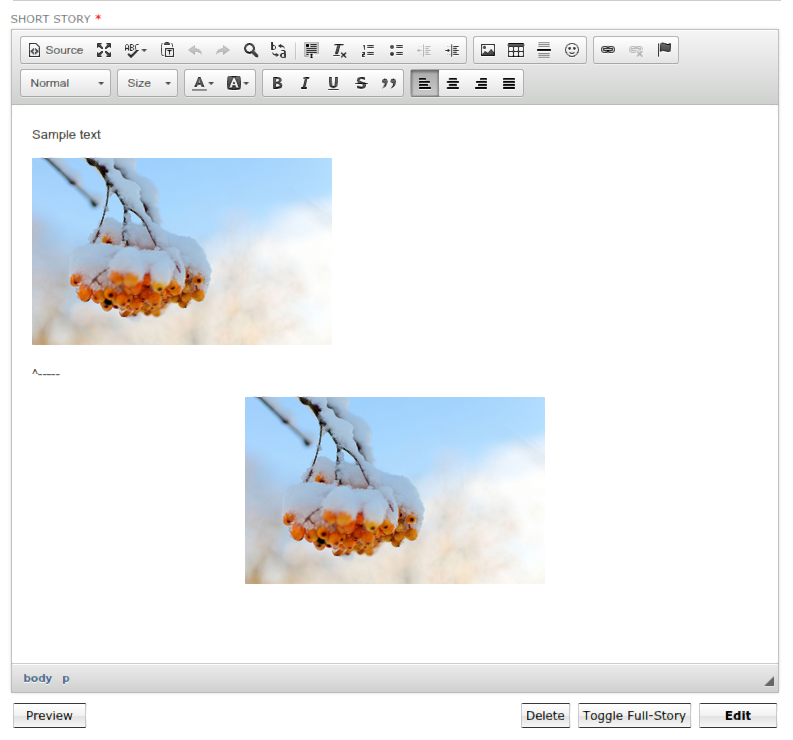
To create and center an image, kindly follow the steps:
1. Create and open a news item in CKEditor.
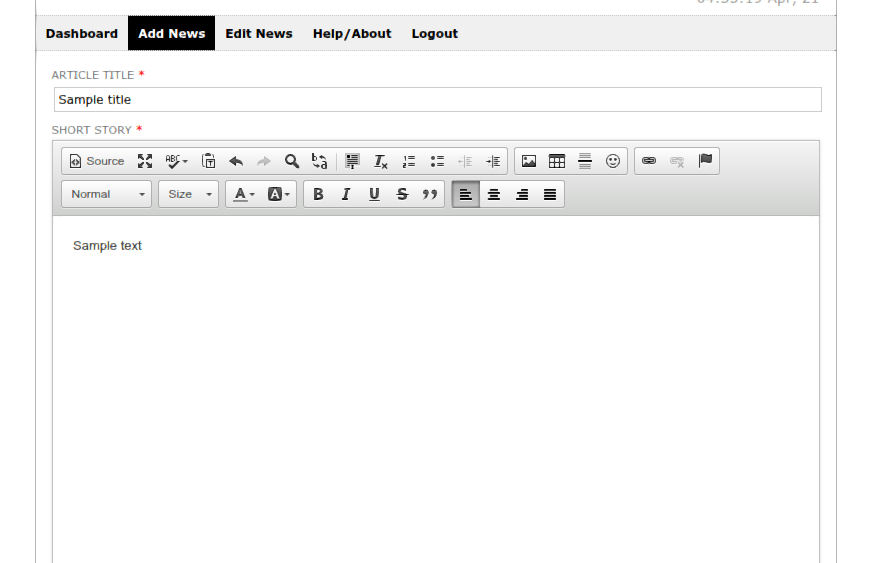
2. Click Insert Image and in the opened window click the Browse Server button.
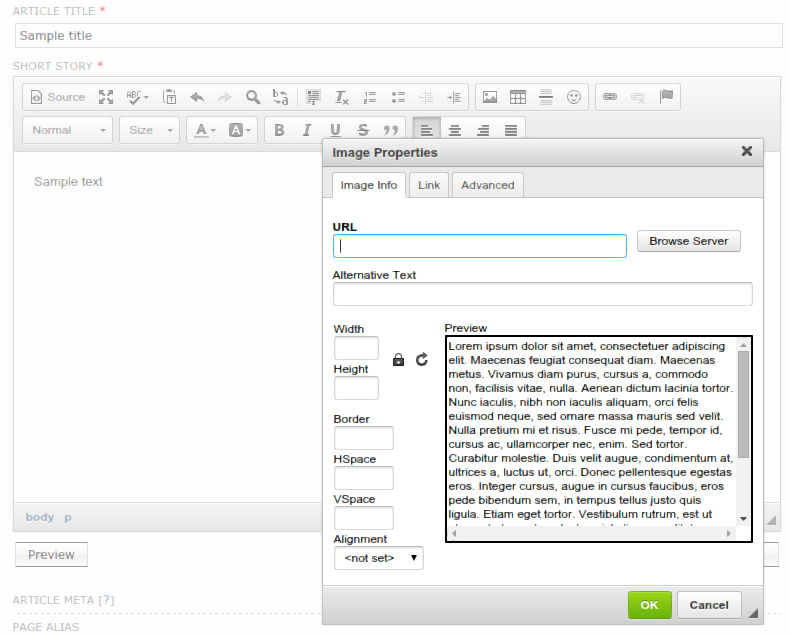
3. Upload an image (or choose an existing one).
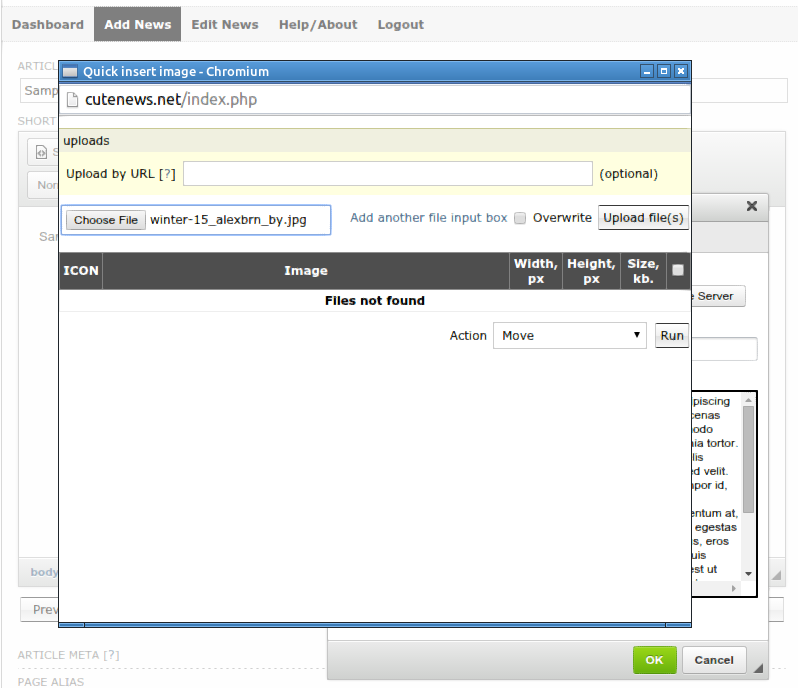
4. Click on the title of the image.
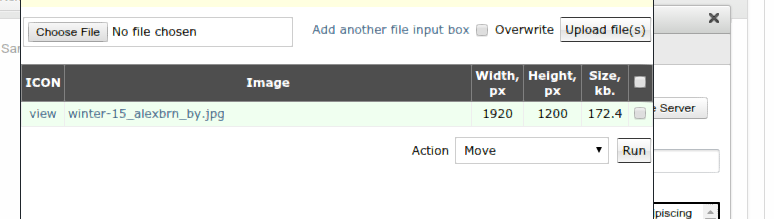
5. When the image will appear in the popup window, click on the lock symbol (optionally).
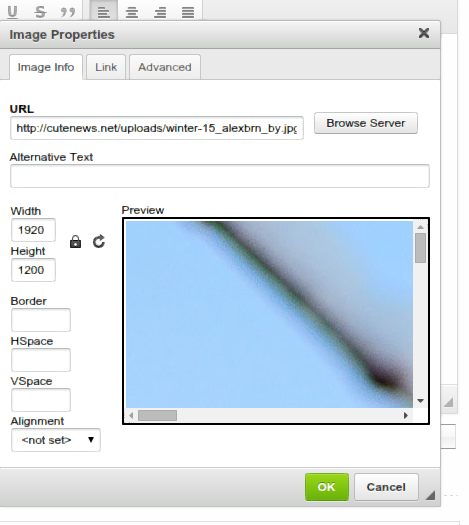
6. You will see the image size parameters (300 pixels in width and the height of the image set by default). Click OK.
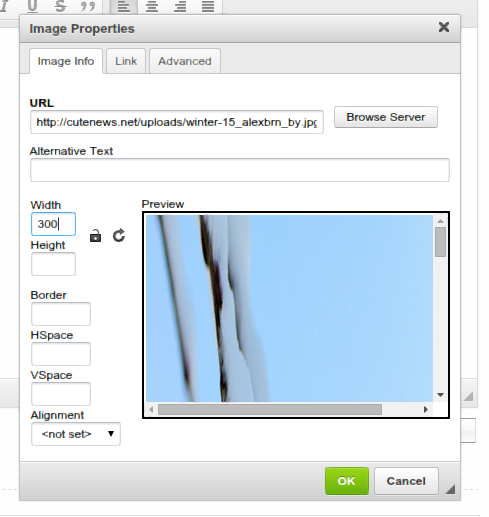
7. Click on Source.
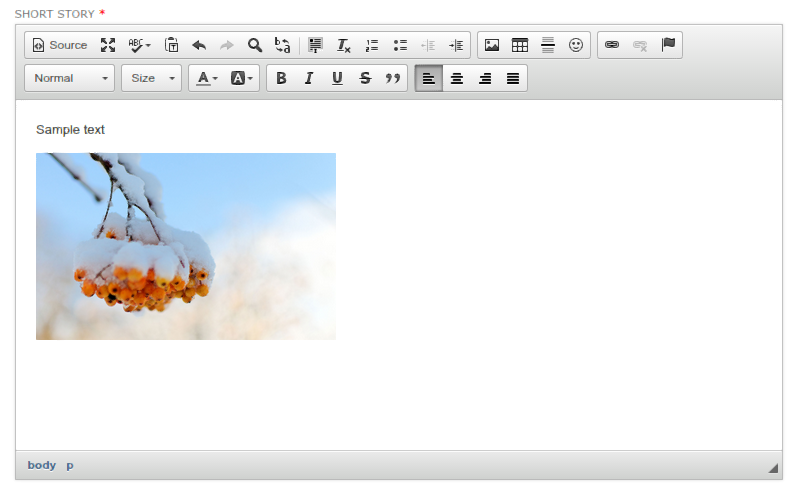
8. Instead of the <p> tag, enveloping <img>, enter <center>, add or save the news.
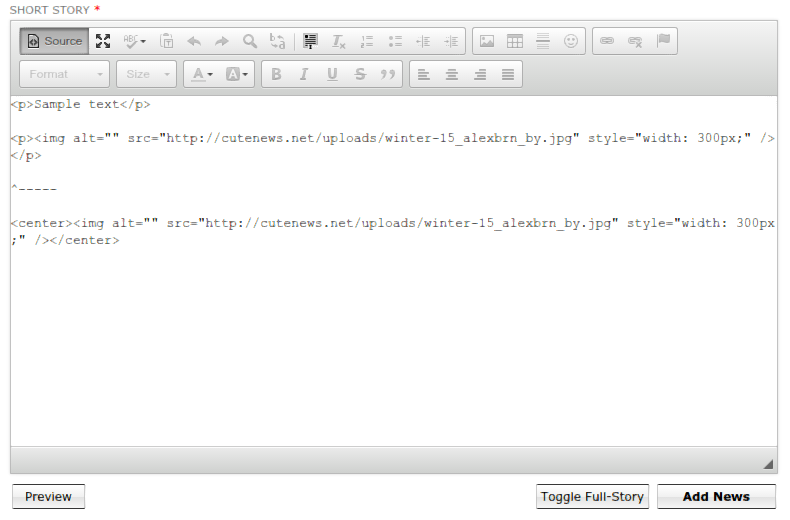
9. You get the result.
To insert from Word try the following steps:
10. Go to Dashboard> System configurations.
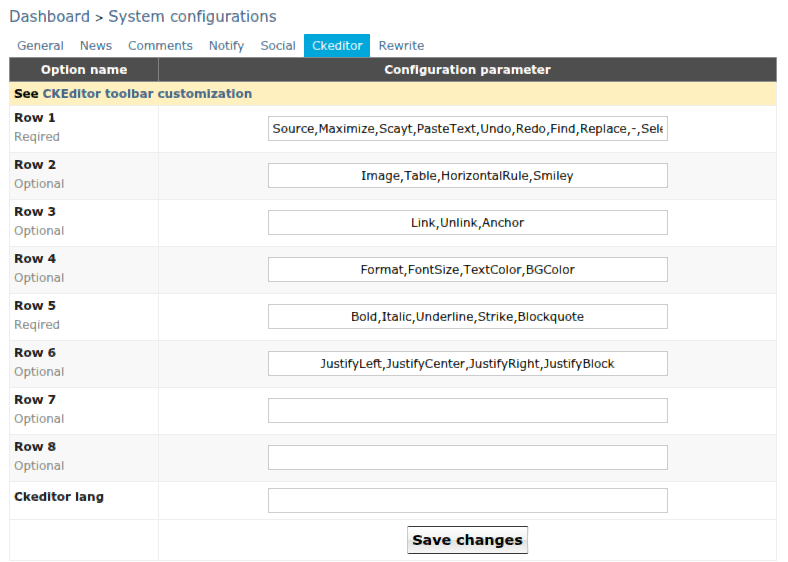
In Row 1, add ",PasteFromWord" after PasteText " to get the following:
Source,Maximize,Scayt,PasteText,PasteFromWord,Undo,Redo,Find,Replace,-,SelectAll,RemoveFormat,NumberedList,BulletedList,Outdent,Indent
After that, use the button with this icon. Simple copying / pasting in CKEDitor may not help.
We also need to mention that the plugin is the official one from the developers of CKEditor and we are not responsible for the way the information will be displayed by CKEditor and its plug-ins.
As to the search, please provide a link to the post or write here how you work with the search, for us to understand the process better.
186 2015-04-16 14:34:48
Re: 404 error custompage (1 replies, posted in Problem Solving / Help & Support)
Processing of error 404 occurs only when 'rewrite' is enabled. You cannot process this message via .htaccess. You can only redirect it to your page 404 in core/core.php using the cn_rewrite_load() function.
Find string header("HTTP/1.0 404 Not Found"); and add header('Location: your_url_of_404'); after it.
187 2015-04-15 09:51:21
Re: Updating frim 1.5 to 2.0.2 (1 replies, posted in Problem Solving / Help & Support)
To upgrade from version 1.5 to 2.0.2 you need to perform data migration, in this case your news won't be lost. Also, after the migration you may need to run the script migration_update_indexes.php.
For a successful migration, install the new version of CN next to the old one and perform data transfer in Dashboard> Maintenance.
188 2015-04-15 09:15:08
Re: Adding Licenses to Your Account (2 replies, posted in Script Feedback and Suggestion)
For questions regarding licenses please email: support@cutephp.com
189 2015-03-30 12:22:08
Re: Mod Rewrite Engine (8 replies, posted in Problem Solving / Help & Support)
I found this in google:
Why can I not find any documentation to this?
What next, where is the layout file?
What should I write in the layout file?
In CuteNews, the htaccess file is generated automatically and you don't have to know what to write in this file if you're not an expert, and that's the reason why there's no documentation for CN. If you need to know what and how to write in the htaccess file, please refer to the official documents .
When enabling rewrite in CN, you just need to make sure that the htaccess file is created in the right place and is processed by the server, as for the the rest, CN converts all the paths to the news automatically.
190 2015-03-30 09:51:09
Re: Categories how are they supposed to work? (7 replies, posted in Problem Solving / Help & Support)
Correction: On checking I have a category "newsletters" I added a new category "newsletter LHS" with "newletters" as parent.
I posted to the child category - the subcategory "newsletter LHS". Result the news item was posted to both the parent and the subcategory. I had to edit the subcategory and remove its Parent setting to "none".Cutenews seemed to be behaving as if I had chosen to post the news in more than one category. I checked this, just in case, but can confirm that I was only posting to the subcategory.
If you output data from the main category, the filter will include all sub-categories as well. This is a normal behavior of CuteNews. If you want only the data of subcategories to be shown, do not assign a parent to it.
191 2015-03-30 09:50:26
Re: Pagination error Cutenews v 2.0.2 (2 replies, posted in Problem Solving / Help & Support)
We are aware of this problem and in the next release it will be fixed. You need to wait for the update.
192 2015-03-23 14:39:13
Re: Installing site search on cutenews 2.0.1 (5 replies, posted in Problem Solving / Help & Support)
You incorrectly named the search field. It should have name="search" while now it has name="story". Please study closely the source code in the following topic https://cutephp.com/forum/index.php?showtopic=44564
193 2015-03-23 14:38:44
Re: Link in template file query (5 replies, posted in Problem Solving / Help & Support)
Hi
Still trying to grasp what does what in version Cutenews 2.0.2.
<div style="width: 300px; word-wrap: break-word; float: left"><strong>[link]{title}[/link]</strong></div>
This code putss a link to the same news article? It also, if clicked shows unwanted detail about the user. Well that is only visible when the Cutenews user is logged in. Accessing the news article as an Internet user provides an opportunity to add a comment. But, I have removed the option to add a comment in one of my templates so what is going on?And, what is this link for. I am a CuteNews !.4.6 user so version 2.0.2 is new to me. In version 1.4.6 there is an option to link to a news article. Where has that option gone?
Geoff
In which template do you apply this structure?
194 2015-03-23 14:37:31
Re: 403 on HTML posting (1 replies, posted in Problem Solving / Help & Support)
Please specify your web server. This problem is related to the functioning of a web server, not CuteNews.
195 2015-03-23 14:35:45
Re: Showing images jquery (1 replies, posted in Problem Solving / Help & Support)
There are no restrictions on using fancybox. You just need to apply the scripts and styles to the required page according to the documentation. Then, at the end of the page you need to define the script for connecting your images to fancybox.
When creating news, you need to input text in HTML to correctly specify the required style types.
196 2015-03-23 14:35:28
Re: Categories how are they supposed to work? (7 replies, posted in Problem Solving / Help & Support)
Please give us more details on the way the error occurs, since there's no functionality defining the rewriting of a subsidiary category.
197 2015-03-23 14:35:00
Re: Syntax error in core.php (3 replies, posted in Problem Solving / Help & Support)
There are no syntax errors in the core of CuteNews. Please give us a piece of code with this error. The problem might be in incorrectly unarchived file.
198 2015-03-23 14:26:17
Re: Mod Rewrite Engine (8 replies, posted in Problem Solving / Help & Support)
You need to check whether the .htaccess file is located in the right directory. Probably, the server identifies the path incorrectly. Please check whether the rules used in your cms contradict the ones of .htaccess.
199 2015-03-11 12:30:24
Re: Next release (5 replies, posted in Script Feedback and Suggestion)
As soon as possible. Currently, we have 42 changes including bug fixes and new features, at the moment the code is being tested and adjusted.
200 2015-03-10 07:36:12
Re: HTML scripts (5 replies, posted in Problem Solving / Help & Support)
Dashboard -> HTML scripts allow you to implement your own javascript or html in the page code to display news, e.g. when you use some functions from javascript library in the news templates.