Hello maciey,
You can use this upgrade https://cutephp.com/forum/index.php?showtopic=44660
Use this guide to upgrade from 2.0.2 to 2.0.4 (1st step), and then use the upgrade instruction from 2.0.3 to 2.0.4 (2nd step).

Dear CuteNews Users! Please feel free to contact us via our new Feedback Form and please send information about bugs to our bug tracker.
You are not logged in. Please login or register.
CutePHP Forums → Posts by Support_Team
Hello maciey,
You can use this upgrade https://cutephp.com/forum/index.php?showtopic=44660
Use this guide to upgrade from 2.0.2 to 2.0.4 (1st step), and then use the upgrade instruction from 2.0.3 to 2.0.4 (2nd step).
Hello maciey,
You can delete comments on the News page with the Administrator rights.
Hello Astro86,
Unfortunately, the copyright position can not be replaced, it is a strictly placed field in every part of news row, according to CuteNews rules.
Hello mariareese,
Due to the configuration file, everything must work fine. Please check if mod_rewrite is switched on at your host.
Hello gotong,
Let`s make it clear step by step:
1. Is your administrative panel located in the /Panel/index.php? Can you call this URL (/Panel/index.php) in the web browser?
2. Is the text, such as [youtube]…[/youtube] saved successfully, and the link still looks like /Panel/index.php?
3. When you save <iframe> and other tags, does it still go to /Panel/index.php ?
It is likely that access to /Panel/index.php is limited via chmod, or in the server settings (if all the above points are correct). It is also possible that .htaccess restricts the access due to the certain rules.
Thank you!
Hello gotong,
Could you please give more information? Please give us the detailed code, how you make it or where do you get it.
Thanks!
Hello newera07,
It is technically impossible for now. To do it, you must additionally write the API to the other server, but unfortunately CuteNews doesn`t provide this feature anymore.
Hello newera07,
Try to disable cache in core/init.php, line #9
define('CACHE_DISABLE', true); // disable cache
Hello newera07!
It looks like the problem is here <br style="clear:both;"> as it`s inserted into the CN core.
To remove it, you have to delete this line: echo '<br style="clear:both;"/>'; in the core/includes/comments.php
Hello Maroon Caludin,
Please copy and paste your .htaccess settings here on forum for better understanding. It is also necessary to check the Dashboard > System configurations fields settings:
1 Use rewrite engine
2 Rewrite prefix
and make sure everything is ok with the server directories.
Hello Maroon Caludin,
You can fix this issue in two ways:
- install the following in the core/init.php file: define('CACHE_DISABLE', true); // disable cache
or
- replace this line $cache_id = md5(json_encode(array($cfilter, $ufilter, $tag, $nocat, $date_out, $nlpros, $sort, $dir)));
with the following
$cache_id = md5(json_encode(array($cfilter, $ufilter, $tag, $nocat, $date_out, $nlpros, $sort, $dir, $source, $archive_id)));
Best regards
Hello,
I never had this problem before and I do not understand why my news doesn't show up.
I've added this into my HTML<?php
$number = 10;
include("/home/****/public_html/cutenews/show_news.php");
?>I did even try this, worked before too.
<?php
$number = 10;
include("cutenews/show_news.php");
?>But nothing does appear when I check my website.
anybody know how to fix this?it worked before...
hopefully someone can help
Hello nagashiwa,
What changes did you make before the proplem appeared? (maybe the version update, changed user rights or anything else)?
Thank you!
Having a small issue with archiving. For one the auto-archive didn't work for me, so I manually did it. I can get it to show on a page, and it'll say it only archived what I asked it to, but when you click the link it shows the most recent news with it. How do I make it not show that?
Hello Maroon Caludin,
Could you please tell what CN version do you use?
And also, which link does not work properly? (please enclose the example link, the domain is not necessary).
Thank you.
So, I tried to use the rewrite thing for the url. I got it to work.
However, when you go to the article the comment form disappears, but only if I have the rewrite option on. No idea why.
Any suggestions?
Hello Maroon Caludin,
Please inform us about your CuteNews version and the requested URL, where the comment form disappears, for example "/news/5.html". Please enclose the News screenshot.
I've poked around, but can't seem to find directions for upgrading to this version. Mostly just older versions. I'm not really sure how to upgrade to this version. Help? x_x
Hello Maroon Caludin,
To upgrade please download the CuteNews code form the website, backup the old data and upload new codes via FTP (exclude cdata folder!), then follow the upgrade instructions 2.0.3 -> 2.0.4 here https://cutephp.com/forum/index.php?showtopic=45787
Hello. Help set the encoding site in UTF-8. In which file you need to specify a parameter?
Hello cooltahen,
if you mean the site, you have to input <meta charset="utf-8"> into <head> tag. You can also configure the UTF8 settings in the admin panel: Dashboard -> System configurations
This release has fixed some security-related issues. We have fixed the profile picture vulnerability and added an extra check on the type of an uploaded file from the Media Gallery and from the user profile.
After installing the update, it's necessary to run the migration script. The migration script from version 2.0.3 to 2.0.4 is located in the /migrations/cn203_204.php folder. After Cutenews updating, this script should be started and executed; then the whole folder /migrations/ should be removed from the server.
Download version 2.0.4 here.
Of course, but the problem is, the changes don't affect anything. There's something weird happening with the css, could you give me an example how to change the color of the links in active news (show_news.php). The default color is blue and there's also the dreaded underline. How can I change those?
*edit*
It seems that by creating a new php-file, which has inline css and show_news.php included I cand change all the other links but the Count of comments, where the underlining does not go away no mater what.
How is that possible?
Page is valid btw.
Thanks for the reply
Orilla,
If you want to change color of the links in the admin panel, you have to replace СSS into default.css.
It you want to change the color of links with show_news.php, it can be done by web-master on your site, following these steps:
input into <head> .. </head> :
<link rel="stylesheet" href="<your_css.css>" /> in your html document, where <your_css.css> is the file with your configurations.
Anyone please, this cannot be this complicated. How do you guys use css on your Cutenews installation?
Hello olliraa!
To edit default.css you have to access the server via FTP and make the editing there.
A small issue with commenting.
Users can comment, and I can, if I'm logged in via the main login screen. But if you try to post a comment (when you're logged out) with your account name, it'll ask you to login. I attempted to, but it always "admin denied login". It only does it with the admin accounts.
Any ideas?
Hello Maroon,
This situation is normal for CN, it is necessary for password brute force prevention. If you want to disable this function, follow these steps:
1. Go to modules/hooks/common.php;
2. find the row if ($user['acl'] == ACL_LEVEL_ADMIN) and change it to if ($user['acl'] == ACL_LEVEL_ADMIN && 0)
to disable checking the administrator`s enter via frontend.
hello,
i have come across an issue. When my news is set in multiple categories it will only be shown in the first category and not in the others, although it is recorded in multiple categories in the cutenews admin end.
is anybody aware of a fix?
thanks.
Hello,
Please replace the code according to the following changes https://github.com/CuteNews/cutenews-2.0/co...ff0b1e45462ea31, especially core/db/coreflat.php file.
Sorry for the late reply.
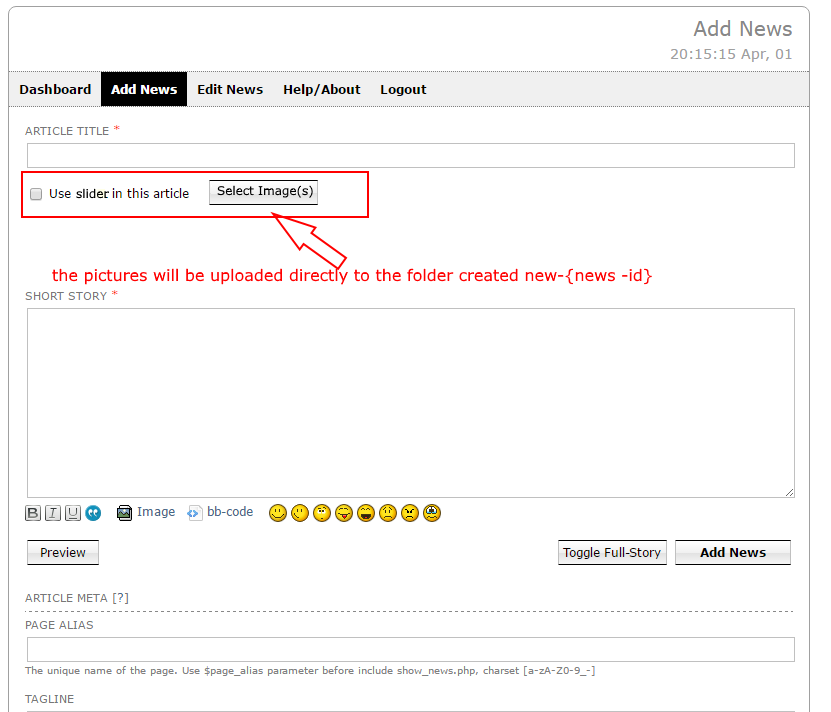
Hello !, I need someone to support me with the following in cutenews 2.0.3:
goal: replacing field { slider } by html code to generate an image gallery within short -story or full -story .
1. Within the menu add news , I need the user to be asked whether to add ( for example) there is a slider using a checkbox .
2. A folder with the name ID of the news (for example /uploads/news/new-{news - id} for example) is automatically generated.
3. The user has a button to load the images into the folder you created earlier .
4. Implementing this php script((code below)) to generate the final HTML code.
5. Replace the field (eg { slider } ) within short -story or full -story above the html code generated .
thanks!!!
<!-- gallery -->

            <?php
                # SETTINGS
                $max_width_img = 350;
                $max_height_img = 350;

                function getPictureType($ext) {
                    if ( preg_match('/jpg|jpeg/i', $ext) ) {
                        return 'jpg';
                    } else if ( preg_match('/png/i', $ext) ) {
                        return 'png';
                    } else if ( preg_match('/gif/i', $ext) ) {
                        return 'gif';
                    } else {
                        return '';
                    }
                }

                function getPictures() {
                    global $max_width_img, $max_height_img;
                    $dir = SERVDIR.'/uploads/news/new-'.$id;  //the path to the folder is incomplete, it has to be implemented to generate the folder respectively the id
                    $dir = 'images'; //use this for test without cutenews
                    if (!file_exists($dir)) {

                            mkdir($dir, 0777, true);
                    }

                    if (is_dir($dir)) {
                        if ( $handle = opendir($dir) ) {
                            $lightbox = rand();
                            $my_code= '<ul id="pictures">';
                            while ( ($file = readdir($handle)) !== false ) {
                                if ( !is_dir($file) ) {
                                    $split = explode('.', $file);
                                    $ext = $split[count($split) - 1];
                                    if ( ($type = getPictureType($ext)) == '' ) {
                                        continue;
                                    }
                                    if ( ! is_dir($dir.'/thumbs') ) {
                                        mkdir($dir.'/thumbs',0777, true);
                                    }
                                    if ( ! file_exists($dir.'/thumbs/'.$file) ) {
                                        if ( $type == 'jpg' ) {
                                            $src = imagecreatefromjpeg($dir.'/'.$file);
                                        } else if ( $type == 'png' ) {
                                            $src = imagecreatefrompng($dir.'/'.$file);
                                        } else if ( $type == 'gif' ) {
                                            $src = imagecreatefromgif($dir.'/'.$file);
                                        }
                                        if ( ($oldW = imagesx($src)) < ($oldH = imagesy($src)) ) {
                                            $newW = $oldW * ($max_width_img / $oldH);
                                            $newH = $max_height_img;
                                        } else {
                                            $newW = $max_width_img;
                                            $newH = $oldH * ($max_height_img / $oldW);
                                        }
                                        $new = imagecreatetruecolor($newW, $newH);
                                        imagecopyresampled($new, $src, 0, 0, 0, 0, $newW, $newH, $oldW, $oldH);
                                        if ( $type == 'jpg' ) {
                                            imagejpeg($new, $dir.'/thumbs/'.$file);
                                        } else if ( $type == 'png' ) {
                                            imagepng($new, $dir.'/thumbs/'.$file);
                                        } else if ( $type == 'gif' ) {
                                            imagegif($new, $dir.'/thumbs/'.$file);
                                        }
                                        imagedestroy($new);
                                        imagedestroy($src);
                                    }
                                    $my_code.= ' * [url=]';
                                    $my_code.= '[img]'.$dir.[/img]';
                                    $my_code.= '[/url]
';
                                }
                            }
                            $my_code.= '</ul>';
                            closedir($handle);
                        }
                    }//echo $my_code;
                }
            ?>

            <!DOCTYPE html PUBLIC "-//W3C//DTD XHTML 1.0 Strict//EN" "http://www.w3.org/TR/xhtml1/DTD/xhtml1-strict.dtd">
<html xmlns="http://www.w3.org/1999/xhtml" dir="ltr" lang="en-US">
<head>
<meta http-equiv="Content-Type" content="text/html; charset=UFT-8" />
<title>Pictures</title>
<link rel="stylesheet" href="css/lightbox.css" type="text/css" media="screen" />
<style type="text/css">
#pictures li {
    float:left;
    height:<?php echo ($max_height + 10); ?>px;
    list-style:none outside;
    width:<?php echo ($max_width + 10); ?>px;
    text-align:center;
}
img {
    border:0;
    outline:none;
}
</style>
</head>
<body>


<?php getPictures(); ?>//call function


<script type="text/javascript" src="js/prototype.js"></script>
<script type="text/javascript" src="js/scriptaculous.js?load=effects,builder"></script>
<script type="text/javascript" src="js/lightbox.js"></script>
</body>
</html>


            <!-- end gallery -->
Hello Shixel,
The code you provided is not clear enough to understand. According to the above instructions, the code can not ne used {slider} for switching the news on and off this way.
We can provide you with the most suitable way of using this code:
1. You have to correct the following:
after global $max_width_img, $max_height_img;
goes if (empty($_REQUEST['id'])) return; else $id = $_REQUEST['id'];
instead of $dir = 'images'; //use this for test without cutenews
it has to be $local = 'uploads/news/new-'.$id;
instead of $my_code.= ' * [url=]';
$my_code.= '[img]'.$dir.[/img]';
$my_code.= '[/url]
';
should be $my_code.= ' * [url=]';
$my_code.= '[img]'.$local.[/img]';
$my_code.= '[/url]
';
(replace $dir to $local)
2. You have to put this code after include show_news.php, otherwise SERVDIR won`t be identified
3. Uncomment }//echo $my_code; to echo $my_code
4. To add the feature specifying an option of showing the {slider}, you have to:
change <?php getPictures(); ?> to <?php include 'cn_api.php'; $e = cn_api_get_entry();
if (!empty($e['mf']['slider'])) getPictures(); ?>
5. Please remember, that uploads/news/new-'.$id folders are filled manually from the gallery, but not from news.
Hope this helps!
Cute works great. However one thing I can not figure out is this.
If I have a side panel on a page with a headline template loading up and click to view that story, its adding the id at the end of the current URL only. So if im on page: aboutus.html and click the link, the uRL is aboutus.html?ID7 etc. The only way it will show the article is if im on the main news page like news.html.
Any idea on how to get around this?
Hello Fearfreak,
If you mean that, clicking the post in news.html, the opening page has to look like this article.html?id=x, then do the following:
please install $PHP_SELF = 'article.html' before include 'show_news.php' (with headline template). This will make all the links opening this way.
I'm moving my web site to a new host.
I've set up the new host and copied by entire web site (inc CuteNews directories) but not yet changed the domain name to point at it (so testing by changing the HOSTS file on my PC)
Everything works apart from CuteNews - I can log in but config settings are missing. The right number of news items are listed but as "no title:", no category, correct date. Clicking on the "no title:" gets me "News entry not found!"
Do I need to take a CuteNews backup on the old server and copy the file to new?
Should I install a fresh copy of CuteNews rather than rely on the FTPed copy?
Should testing by using changed HOSTS file work OK?
Hello rob1951,
1. Please make sure you have copied all data (especially CDATA folder), and the folders` and directiories` rights still allow reading and recodring.
2. Open the CN settings and check the site directory, especially "General" > "Server upload dir" section, and the Rewrite section.
3. It is likely that the web-directory to Cutenews stays the same as previous.
CutePHP Forums → Posts by Support_Team
Powered by PunBB, supported by Informer Technologies, Inc.
The pun_antispam official extension is installed. Copyright © 2003–2009 PunBB.
